Salesforce · AI Platform
Predicting the future: custom propensity scoring.
Overview
- Problem Personalizing at scale meant predicting customer behavior, but building those models took multi-tiered data science pipelines far out of reach for marketers.
- Solution Salesforce’s first no-code prediction builder, a templated wizard that turns complex ML setup into low-friction UI blocks, so non-technical teams deploy propensity scores themselves.
01
Context & the Core Problem.
In modern enterprise landscapes, connecting meaningfully with target audiences has become increasingly high-stakes due to volatile economic conditions and shifting market trends. When cross-functional teams want to execute customer touchpoints, they operate under a unified, high-level job to be done:
“When we communicate with our customers, we want to do so in a manner that is personalized to their unique context so we can drive higher engagement.”
True personalization is not an aesthetic luxury; it is an economic necessity. Data from McKinsey & Company establishes that organizations excelling at personalization generate 40% more revenue from those specific activities than average players.
However, personalization is an intricate process. Understanding individual customer preferences and calculating their next likely behavior is the critical first block of the journey. To tackle this, our team explored how Einstein (Salesforce’s AI engine) could increase the operational value of Salesforce’s Customer Data Platform (CDP), a data infrastructure layer that aggregates customer data from disparate external sources into a single, centralized customer database containing all historical touchpoints and product interactions.
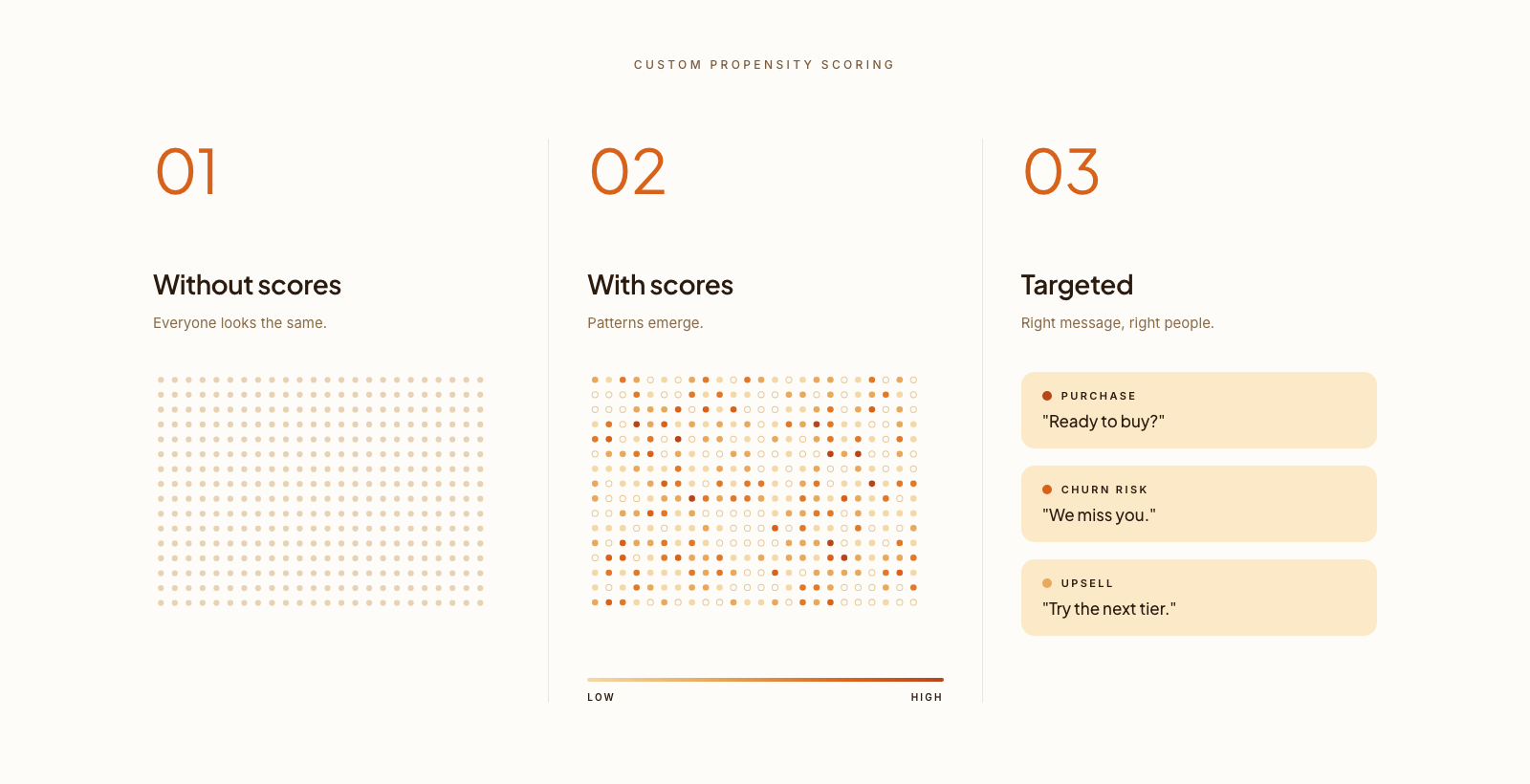
Impact at a glance
- Pilot → Global GA scaled from a three-customer pilot to a global General Availability release, serving core enterprise tenants.
- 1 utility patent US20240193466A1, protecting the no-code, multi-layered configuration wizard methodology.
- Validated in enterprise pilots with Athleta, PVR, and PGA Tour Superstore before the global rollout.
02
The Discovery Phase.
We anchored the work in three validation streams: research insights, the gaps in our existing product, and competitor capability maps.
Research insights.
In early 2022 we ran a qualitative study, 90-minute interviews with 8 domain experts (6 Enterprise Marketers, 2 Data Architects) across varied verticals and databases. The synthesis was definitive: predictive modeling tied to purchase intent and churn risk was a top-3 feature requirement.
“Three years ago, we tried to build something exactly like this internally and it never had any legs. This is something our company actively wants, provided it works reliably. I would definitely use this.”
The existing feature gap.
Salesforce’s 2021 CDP predictive capability surfaced only basic engagement scores (email opens, clicks). An architectural audit found three crippling gaps:
- Feature inefficiency. The models ignored the rich profile data already sitting in the CDP.
- Lack of functionality. The engine couldn’t calculate real business outcomes like churn risk or purchase propensity.
- Non-configurable. The UI was static; users couldn’t tune the predictive variables to their own parameters.
That was the competitive runway: a configurable segmentation experience that could be an approachable first step in an enterprise’s personalization journey.
Navigating early ambiguity.
Joining amid high ambiguity, I partnered with Product to map the core architecture around three questions:
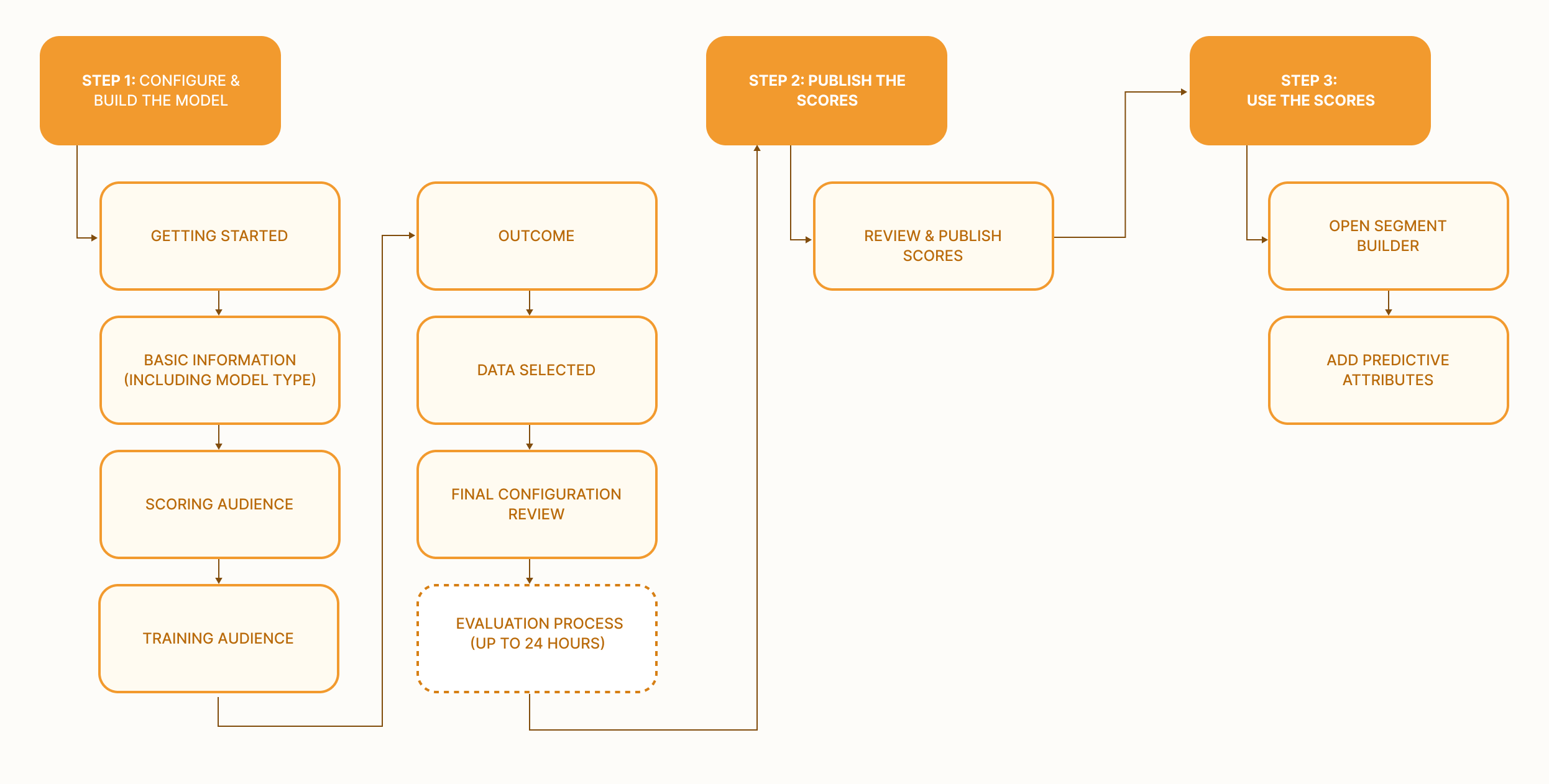
- What are the key milestones of the end-to-end journey?
- What data inputs do marketers need to provide?
- Where does this live in our ecosystem, and how do marketers use the scores downstream?
That mapped three phases, Configure & Build, Review & Publish, and Leverage, and I kicked off rapid iterations.
Our first design put the Outcome step before audience and data inputs, matching users’ mental model. Testing surfaced three insights:
- Outcome-first preference (validated). Marketers enter thinking about the business objective, so defining the outcome early cut cognitive friction.
- Rule configuration friction. Manual multi-conditional logic confused users, who worried how their inputs would be read.
- Trust through transparency. Quality metrics built confidence, but users felt unequipped to fix a model flagged as poor.
The reality check: technical & strategic constraints.
Turning those insights into product meant balancing ideal-state UX against strict data-science realities.
- Schema mismatch (outcome vs. audience). The backend couldn’t run predictions without isolating the audience first, so we pivoted to an Audience-First sequence and reframed “Outcome” as a “Training Audience”, the past behaviors the AI learns from.
- Model-quality dilemma. The end-of-wizard Scorecard preview was a dead-end, it flagged poor quality but offered no way to fix the inputs. We deferred remediation to V2 and focused the MVP on clear post-deployment status tracking.
- Scoping timeframes. Instead of full flexibility, we standardized purchase propensity to a fixed 28-day window (28-day lookback) on a pilot customer’s feedback, launching lean while gathering real-world requirements.
03
Balancing Human Logic with Machine Logic.
The core UX challenge was translating between two mental models:
- Human (abstract goals). Marketers think in outcomes, “Increase shoe sales”, and expect the system to figure it out. This drove our outcome-first design.
- Machine (historical data). Predictive AI only reads data patterns. Before it predicts who’ll buy shoes, it needs a Training Audience, people who already bought shoes, to learn from.
So I designed a progressive UI that guided users to think like the machine without it feeling like a technical chore.
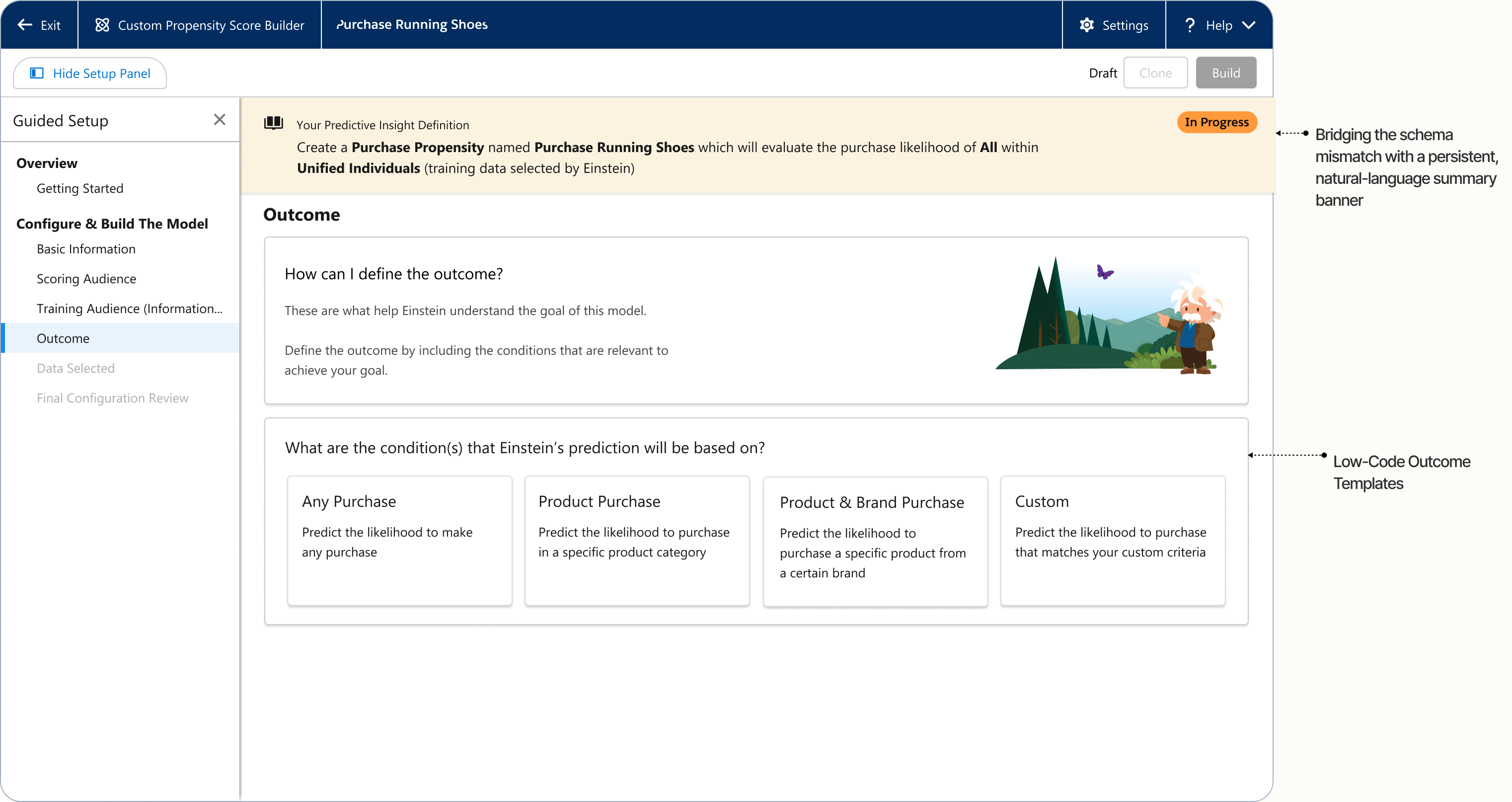
A persistent, natural-language summary banner.
I structured a progressive configuration train: isolate the audience first, then surface contextual cards for specific actions. A persistent, natural-language summary banner compiled selections into a readable string, bridging the backend’s needs and the user’s mental model.
Low-code outcome templates.
Instead of building multi-conditional logic from scratch, marketers pick from pre-configured outcome templates; selecting one populates the behavioral logic matrix, turning a syntax task into a quick validation.
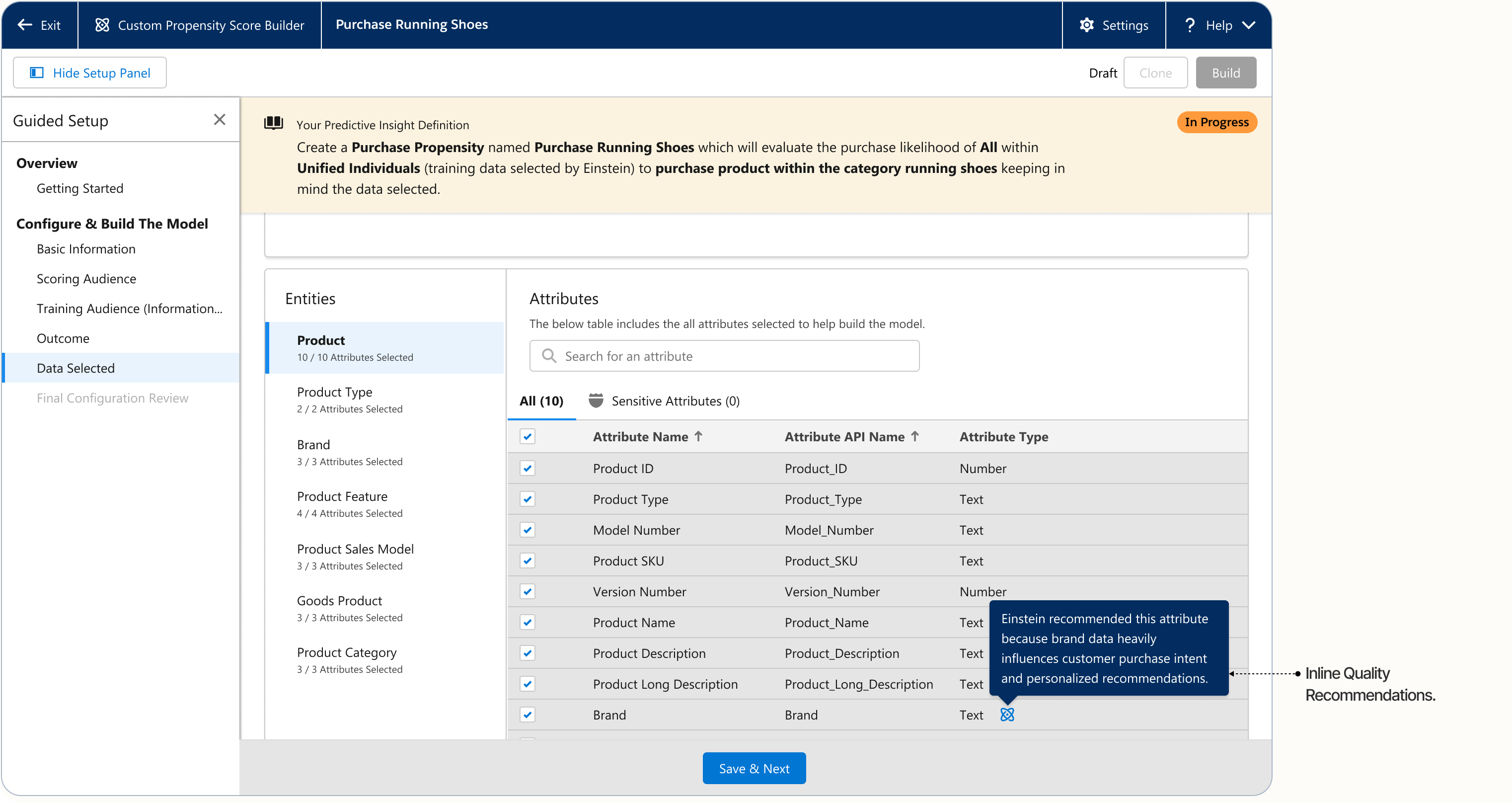
Inline quality recommendations.
Rather than a passive post-calculation review, I put real-time quality guidance right in the data-selection step. As users configure streams, the system flags missing high-signal attributes, shifting from retrospective error states to proactive coaching before compute is spent.
Ethical safeguards.
Our Data Architects needed absolute clarity on which attributes fed the training loop, and a guard against training on bias-heavy or non-compliant data.
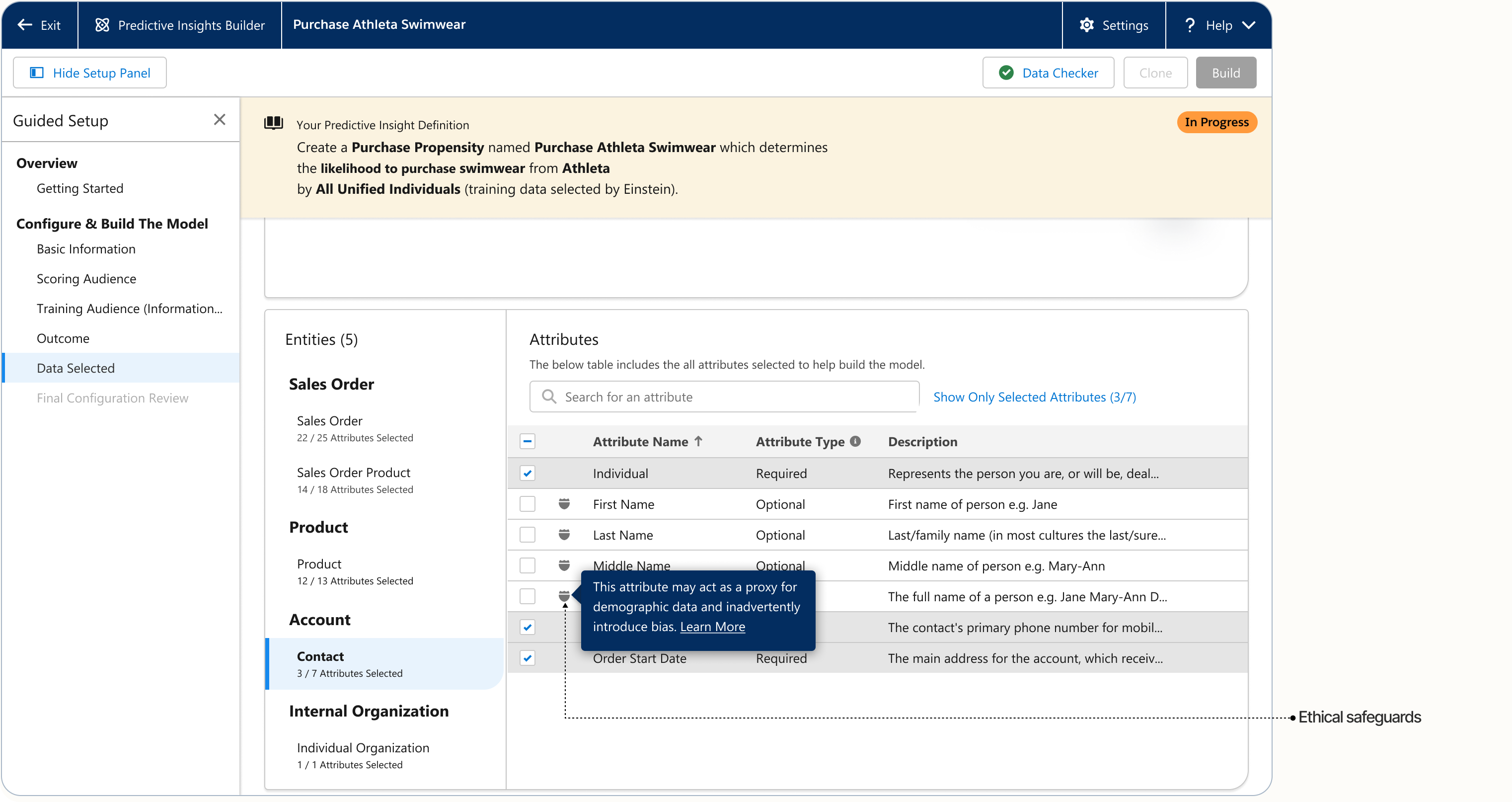
I built a split-view screen that groups enterprise data assets, and, with our AI Ethics specialist, a dedicated “Sensitive Attributes” audit tab that flags fields which might introduce bias with a Shield icon, making compliance native to the workflow.
Orchestrating latency.
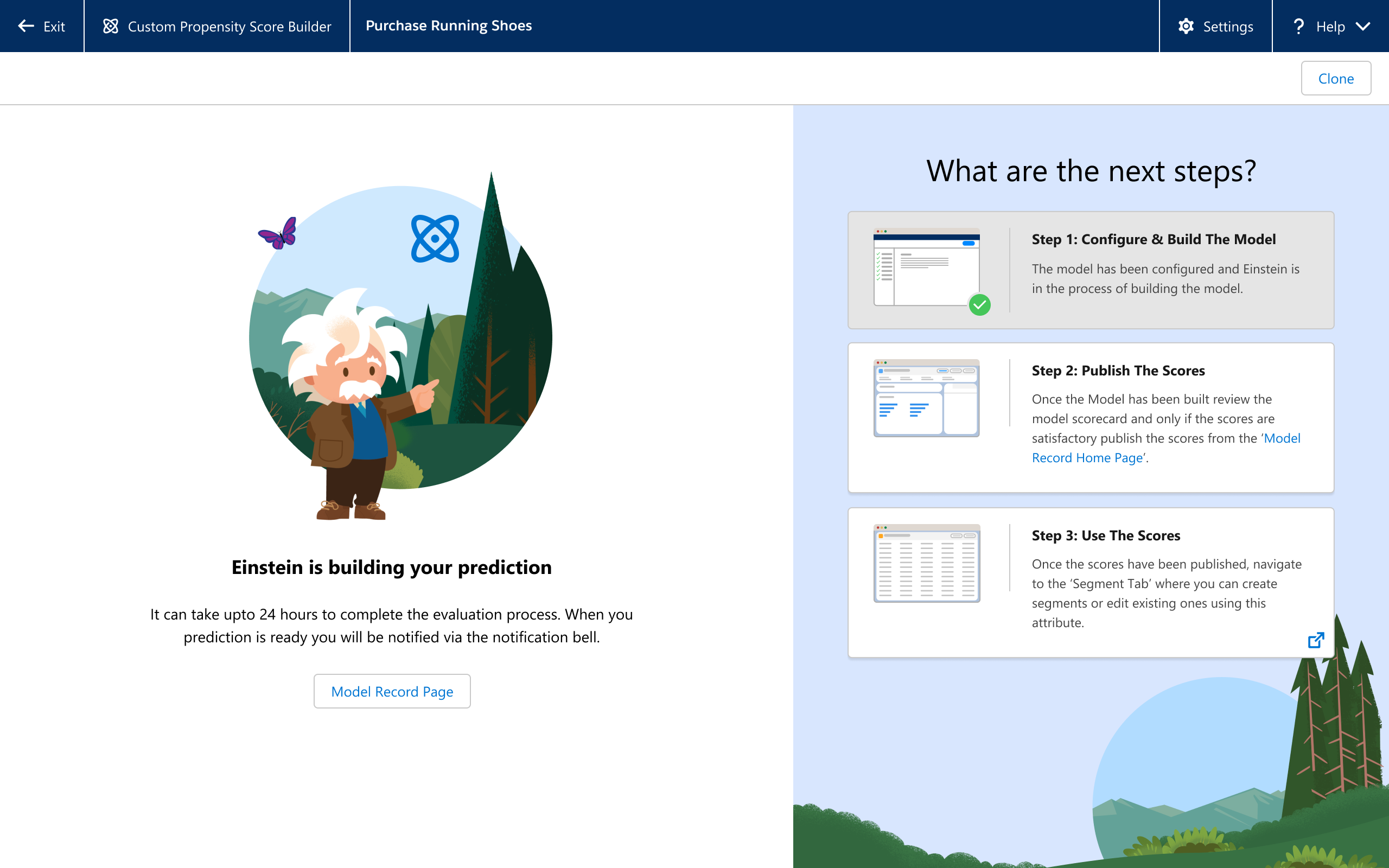
Training across millions of records can take up to 24 hours, so the flow had to set expectations before users commit resources. Instead of a generic spinner, the post-submission screen shows a processing status card and maps the downstream next steps (publish scores, build segments), keeping users oriented through the wait.
04
Business Impact.
-
Successful product scaling
Pilot to global GA.
Successfully guided the feature architecture from an early three-customer pilot phase to a global General Availability release, serving core enterprise tenants.
-
Intellectual property protection
Patent US20240193466A1
Filed and published a US utility patent legally protecting the multi-layered, no-code configuration wizard methodology designed to make complex data modeling accessible to non-technical operators.
Reflections & design takeaways
In enterprise AI application design, polished visual layouts are only effective if they directly align with underlying engineering and data structures. The real value of a product designer in this space lies in translation, building intuitive cognitive bridges over complex machine logic so everyday business users can execute advanced workflows with total confidence.