Salesforce · Sep 2023 to Jan 2026
Campaign Creation with Gen AI.
Overview
- Problem Building a marketing campaign meant weeks of manual configuration across fragmented, legacy tools.
- Solution An agentic, conversational canvas that drafts, previews, and refines full multi-channel campaigns in minutes, with the marketer always in control.
Impact at a glance
- ~70% adoption of all orgs with Agentforce activated, since the Spring ’26 rollout.
- >50% weekly active of adopted accounts, a sticky core weekly routine.
- Unlocked exec funding traction that resourced the broader Marketing Goals Agent · patent pending.
01
The Grind vs. The Goal.
Modern marketers are drowning in manual configuration. When teams are stuck fighting legacy tools:
- The customer experience degrades into fragmented, irrelevant noise.
- Teams become burnout-rich and insight-poor.
The mission wasn’t just to build a faster text generator. We needed to simplify the end-to-end campaign lifecycle, empowering marketers to build at the pace of an idea.
02
The Vision & The Guardrails.
To pull this off, we needed an engine built on two non-negotiable design pillars. Every downstream decision was anchored here:
- Robust Grounding: Anchoring AI in brand guidelines, historical data, and audience insights so the agent generates safe, relevant content.
- Human-in-the-Loop (HITL) Control: Giving the marketer a persistent, editable brief. The AI holds the pen, but the human steers the ship.

03
Navigating Constraints: The Architectural Evolution
Building ahead of the curve, we evolved the architecture through four phases, each balancing platform constraints, user needs, and fast-expanding AI capabilities.

01 Draft With Einstein The Spark · Spring 2024
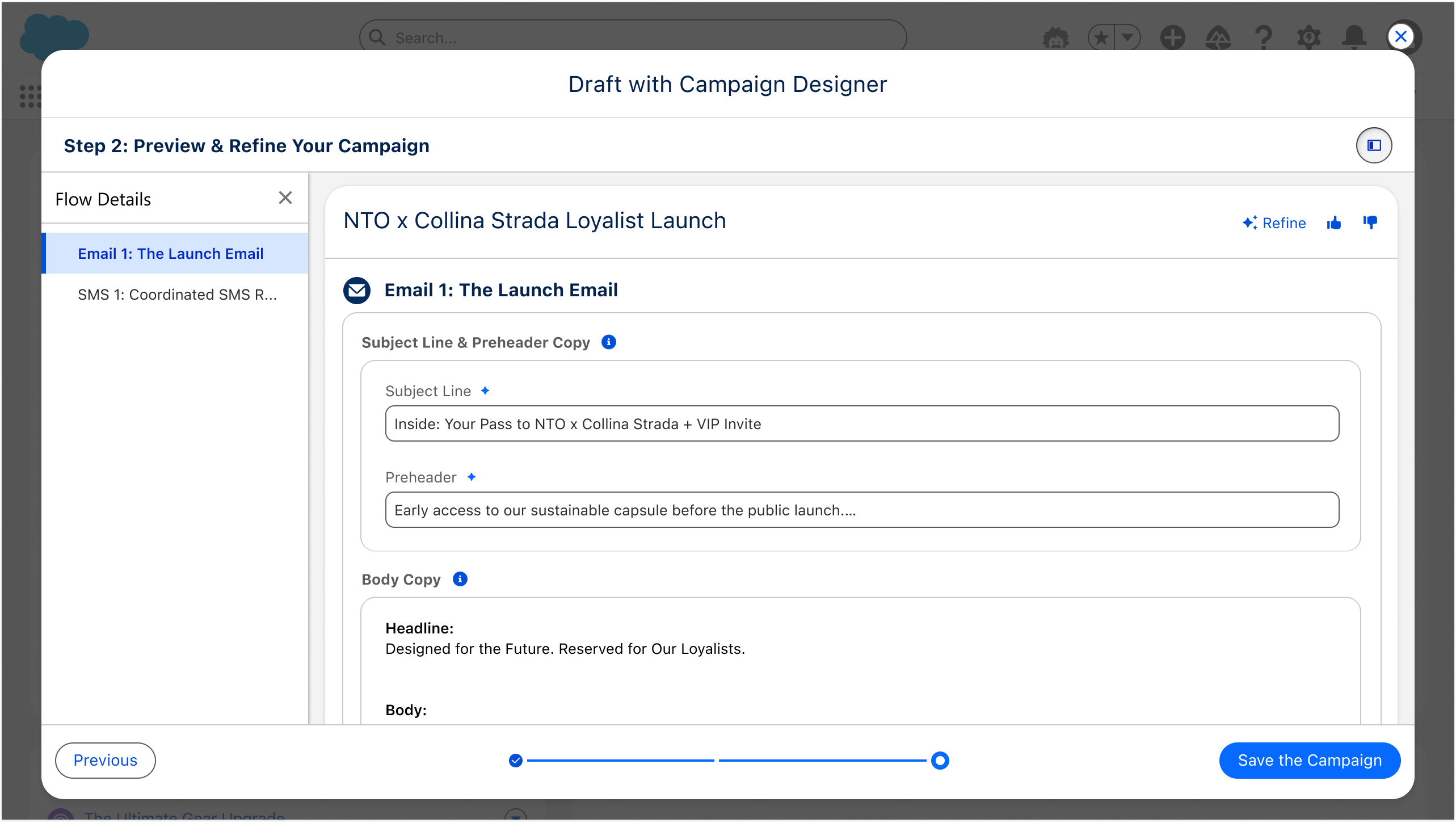
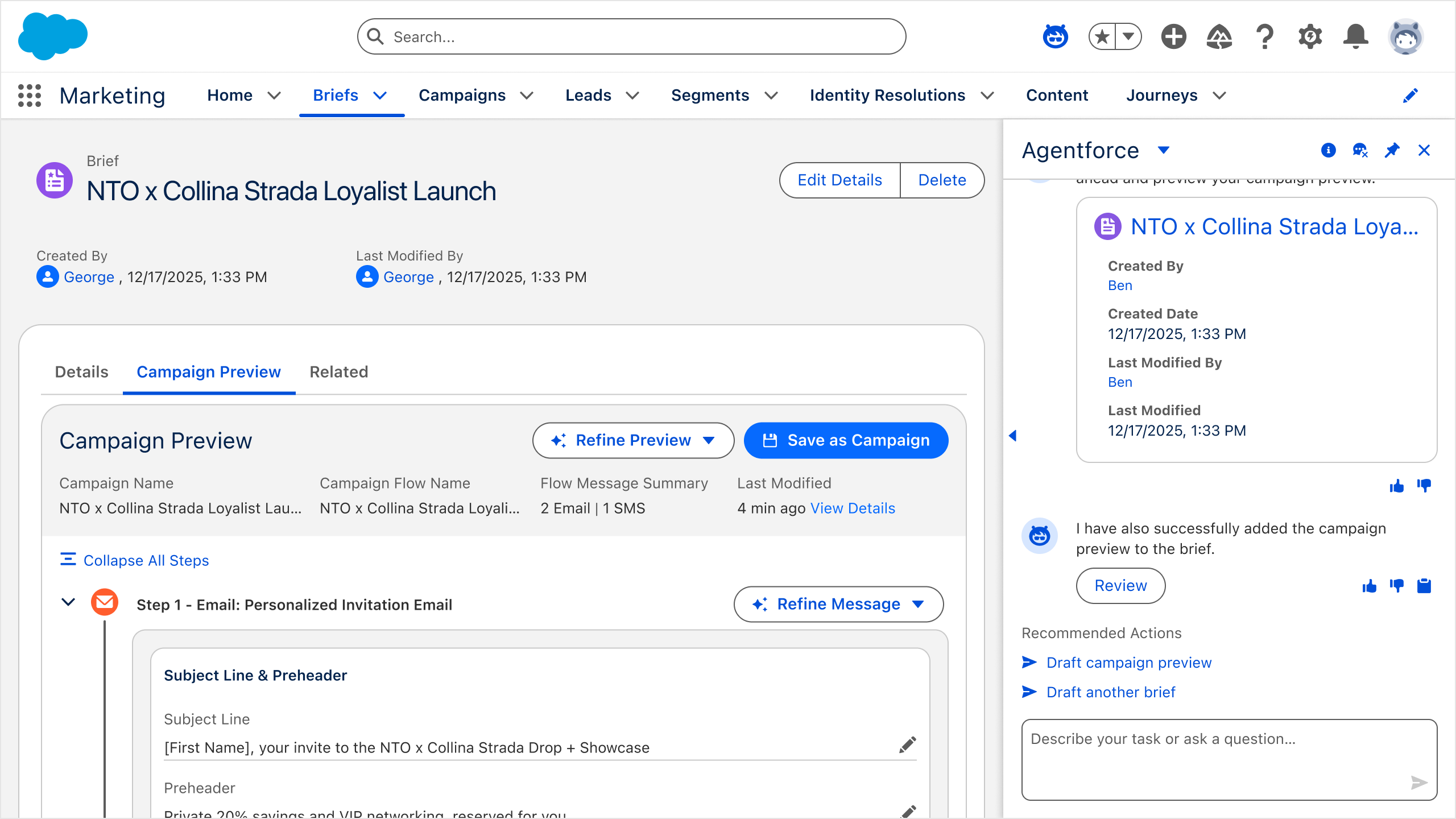
04
Solving the Hard Problems: The Design Transformation
The evolution above is the what. This is the how, the hard problems I had to solve to make it real, all rooted in the second pillar: the AI holds the pen, the human steers the ship. That meant giving marketers:
- A surface they can steer, from a cramped 300px panel to a full canvas.
- Output they can trust, provenance, guardrails, and graceful failure.
- Control that doesn’t cost a prompt every time, intent-based direct manipulation.
The surface: from a 300px panel to a canvas
Marketers can’t steer what they can’t see.

Phase 2 forced the sharpest decision of the project: marketers were orchestrating campaigns they couldn’t actually see. I scoped two ways out:
How might we help marketers build multi-channel campaigns with deep previews, and granular control?

Open Builder
Set asideA full canvas of its own.
- Draft vs. live blurred
- A new surface to learn
- Months of net-new build

Wide-canvas Modal
ChosenA modal that breaks the 300px cap.
- Whole campaign visible
- No new navigation
- Reused the modal shell
I chose the modal even though, at the time, Salesforce modals couldn’t yet host the conversational panel. The clarity win outweighed the constraint, and Phase 4 later closed that gap.
Then I tested it.
Before we wrote production code, I put the wide-canvas modal in marketers’ hands. About 90% said they’d adopt it on paper, but the score wasn’t the real signal; the behavior was. Watching real use surfaced two fixes I made before we shipped.
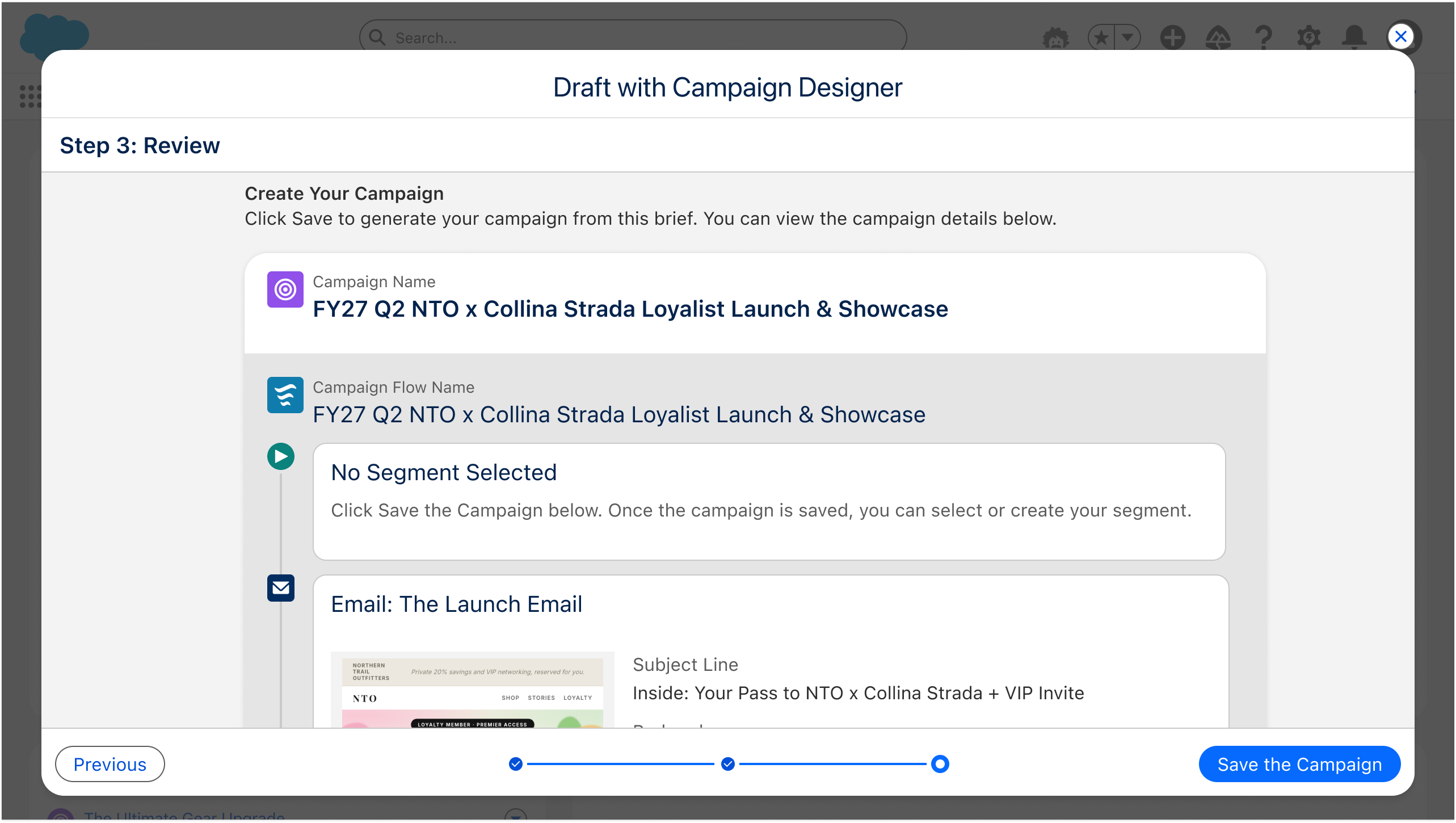
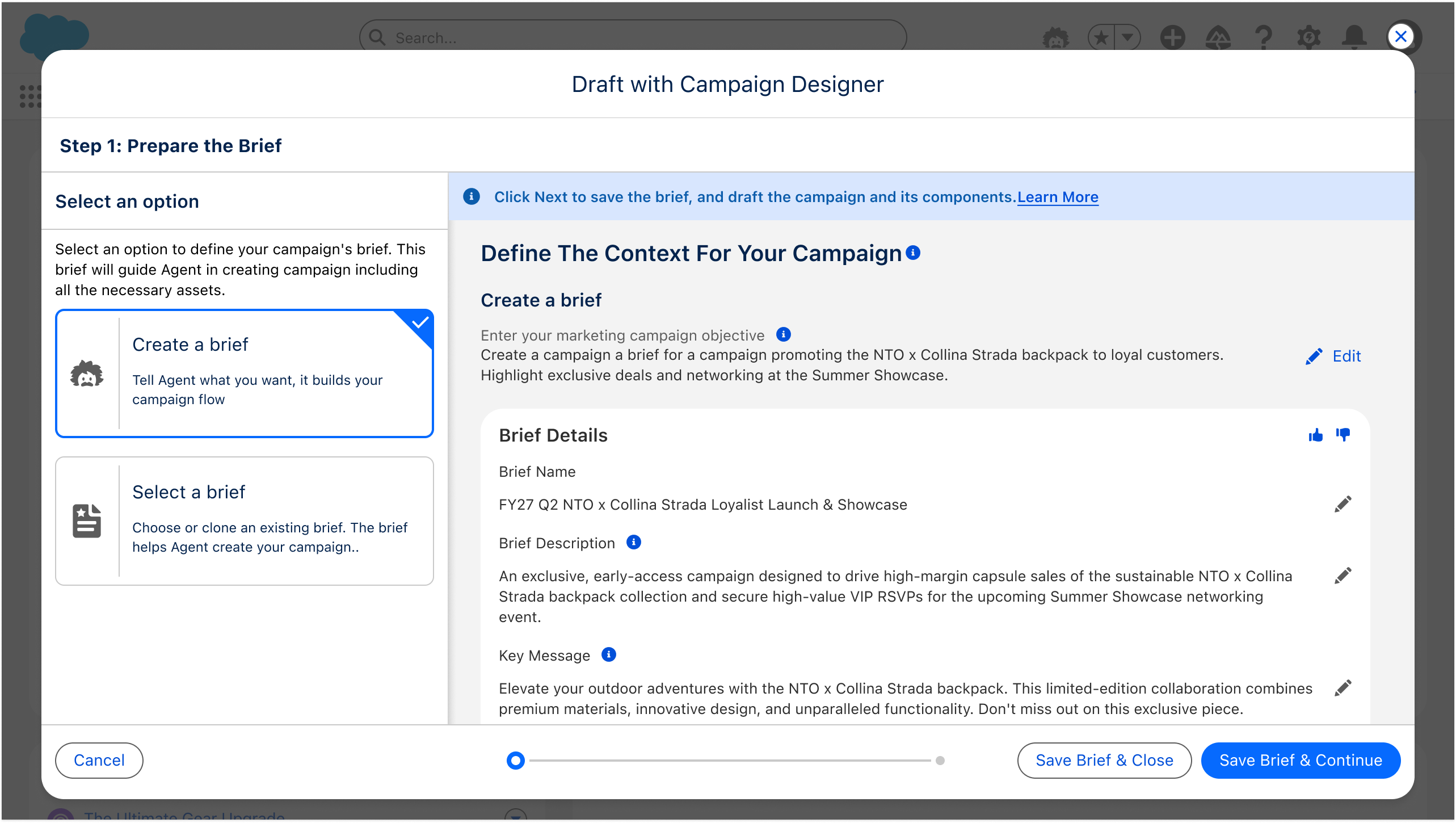
The step we cut
-
1. Prepare the brief
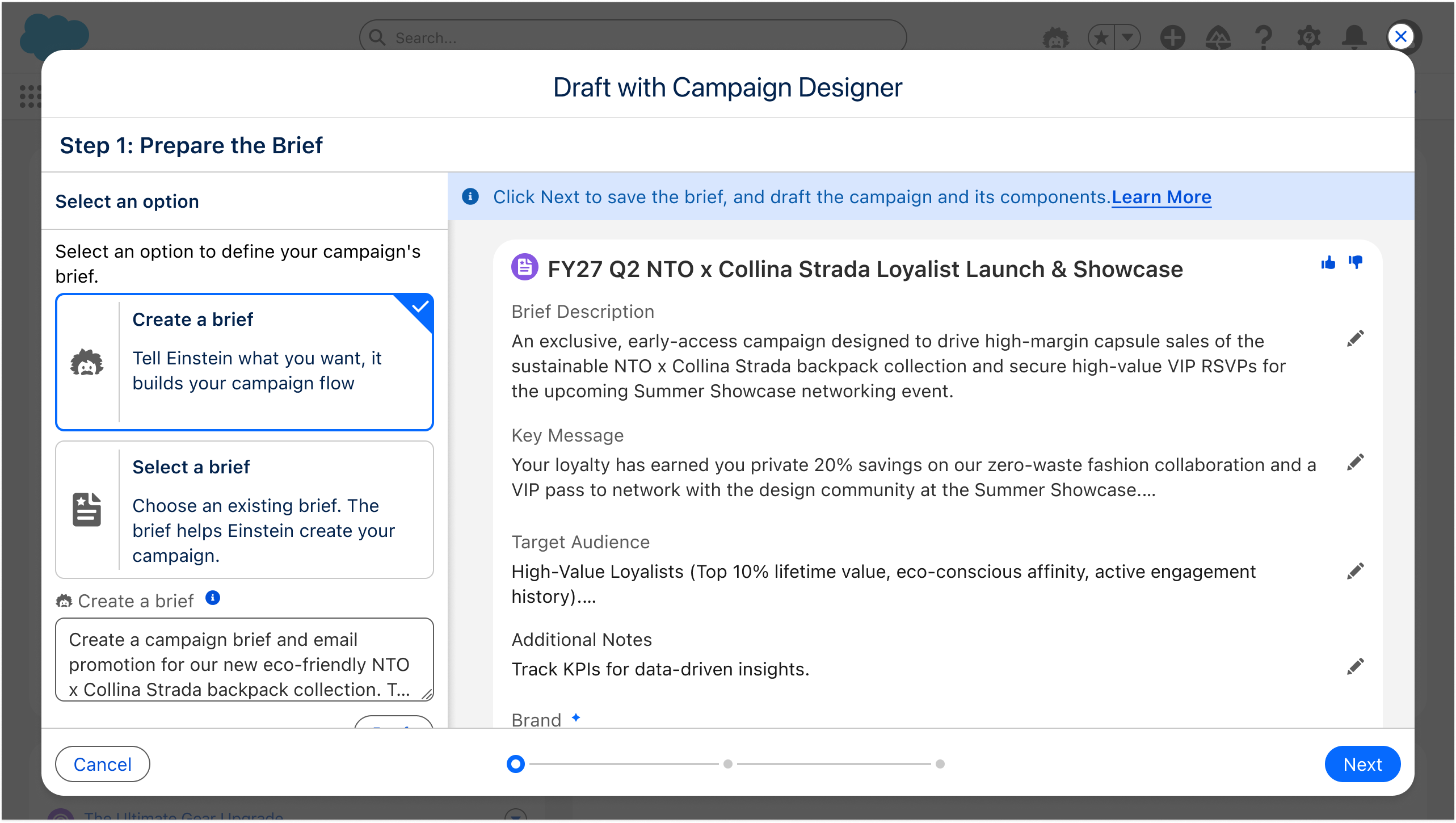
-
2. Preview & refine
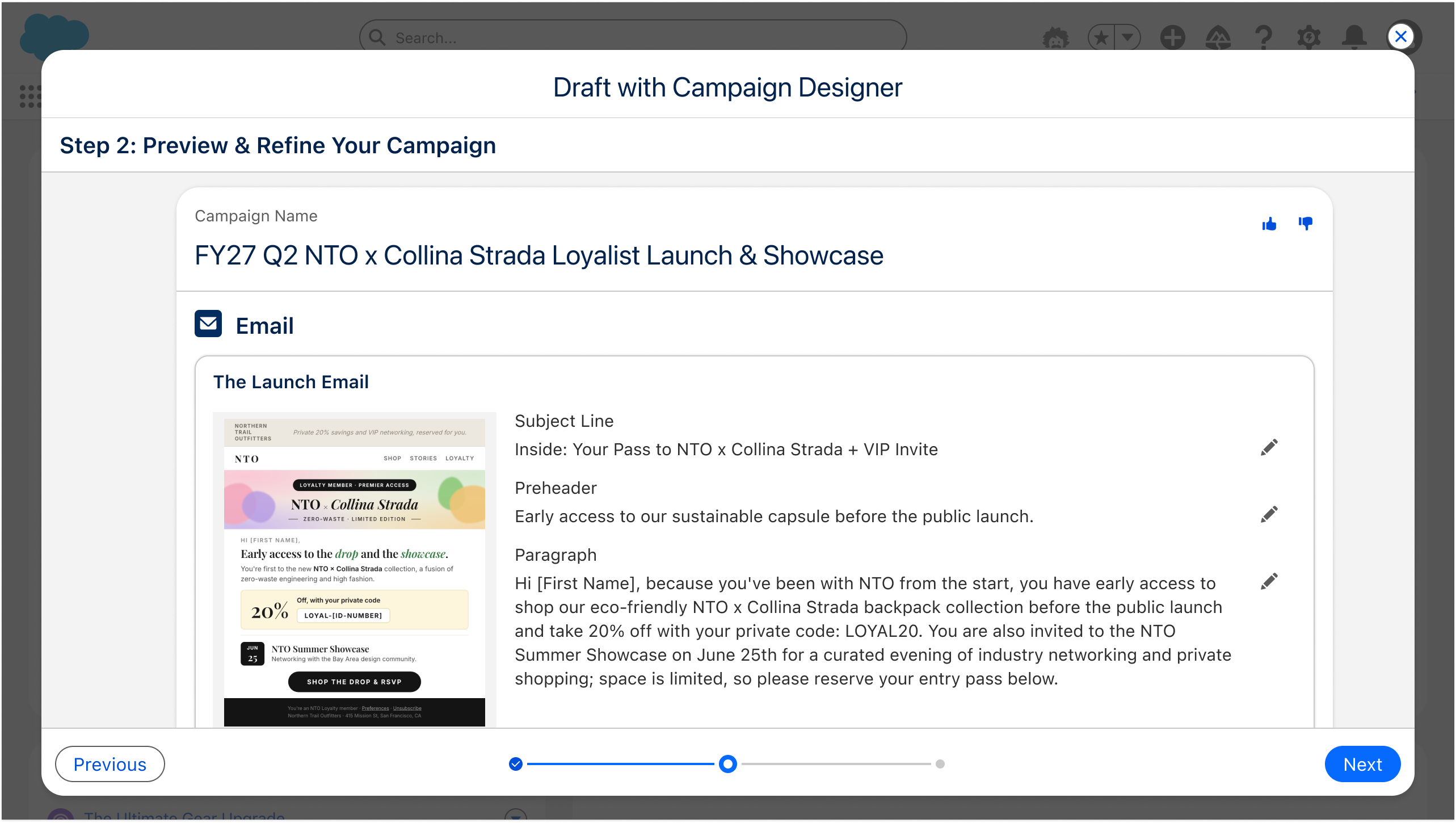
-
3. Review
-
1. Prepare the brief
-
2. Preview & refine
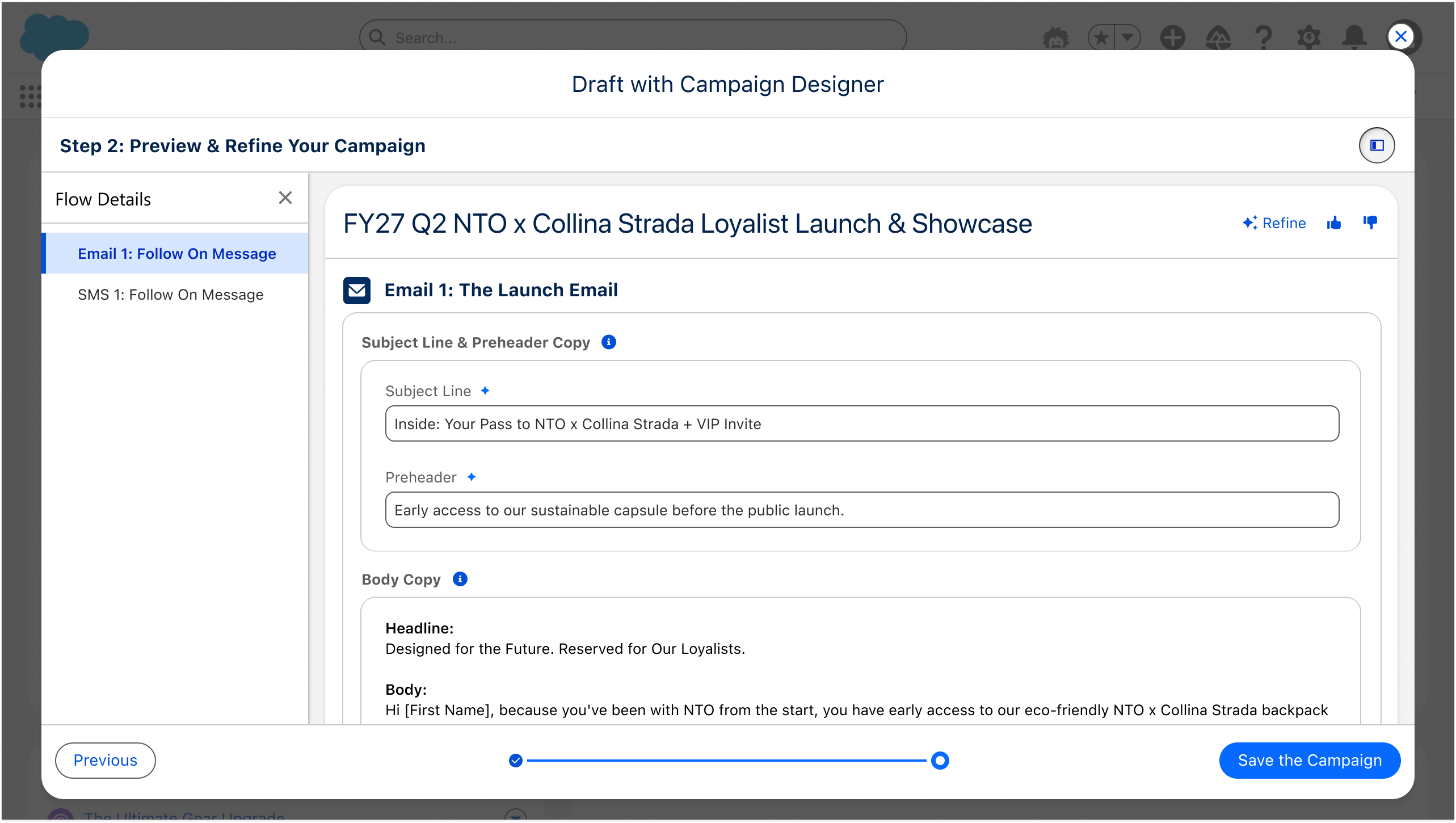
Watching real use revealed a confirmation step marketers didn’t need, so I collapsed a three-step wizard into a leaner two-step workspace.
The interactive illusion
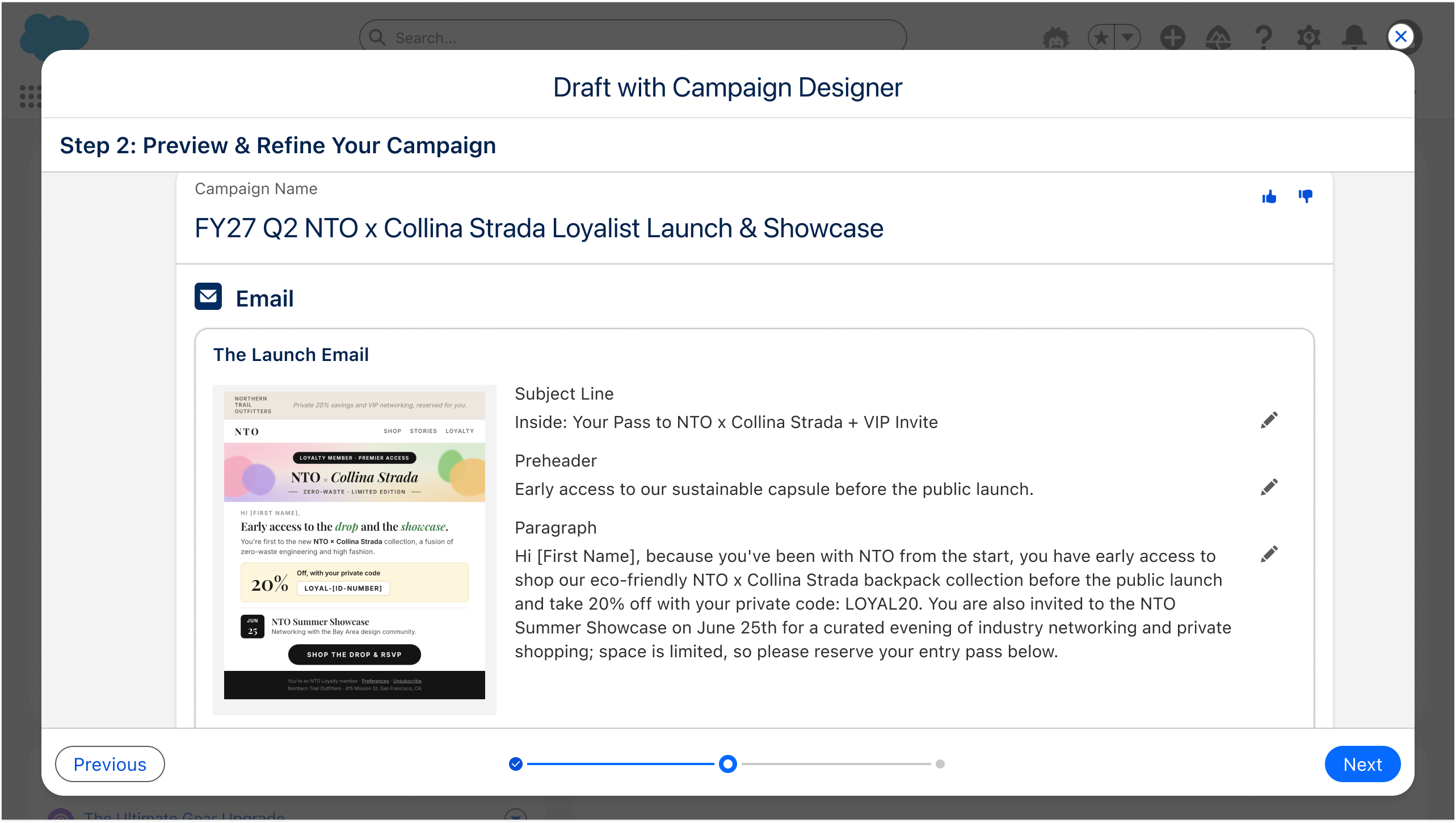
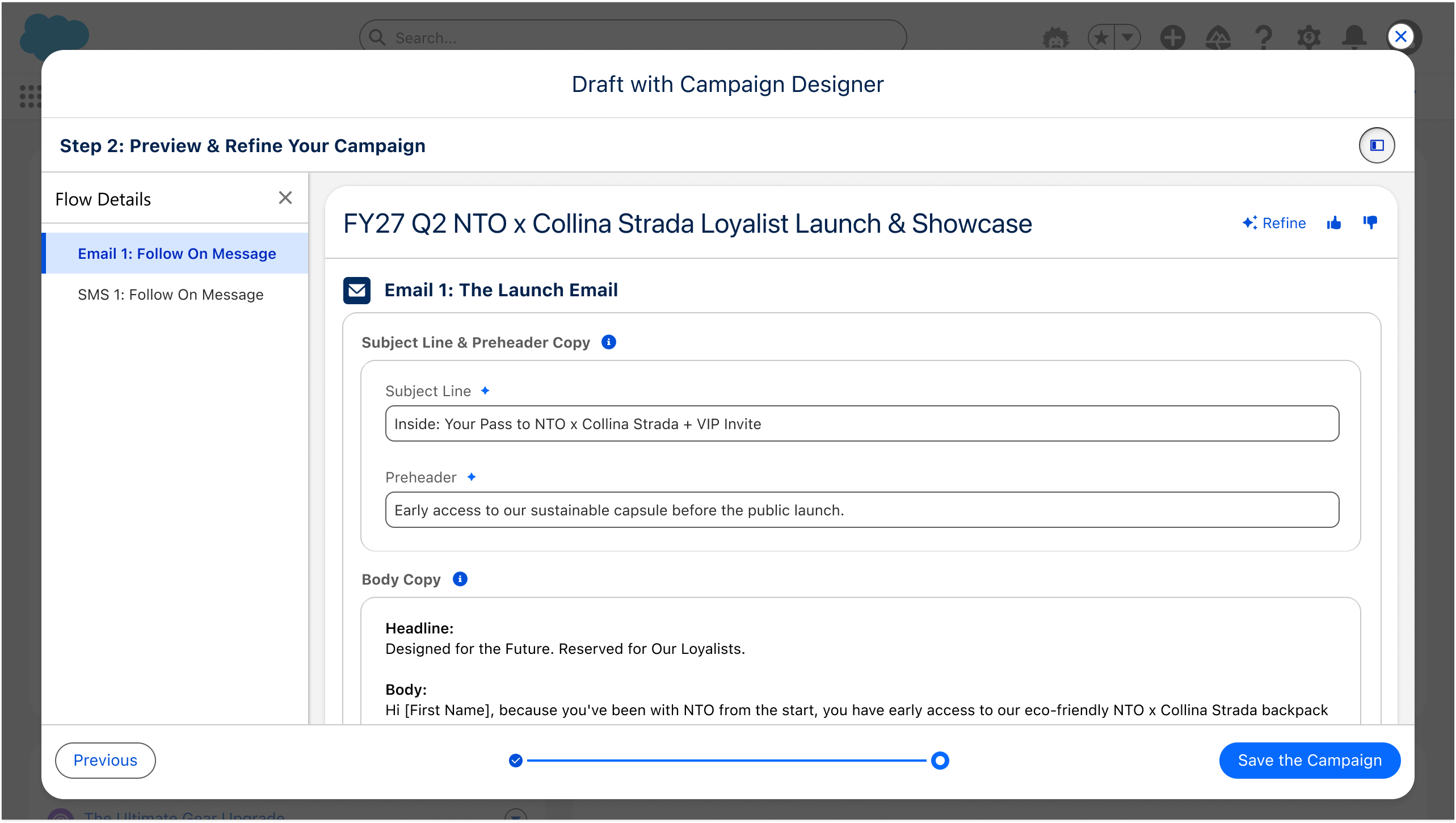
The polished preview looked editable, but marketers couldn’t touch the details they wanted to change. Stripping each message back to raw copy gave them a clear space to edit the words.
Because that same testing surfaced something deeper: two problems no amount of canvas space could fix. Marketers couldn’t always tell which words were theirs and which were the agent’s, and they were worn down re-typing prompts for small tweaks. Those two signals, trust and refinement fatigue, defined the next stretch of work, and ultimately converged in the native Phase 4 agent.
The output: designing for non-deterministic trust
Marketers can’t trust a pen they can’t audit.
The first Phase 3 signal, “who wrote what?”, was a trust problem. An agent that drafts content is only useful if the marketer trusts it. Three failure modes threatened that trust:
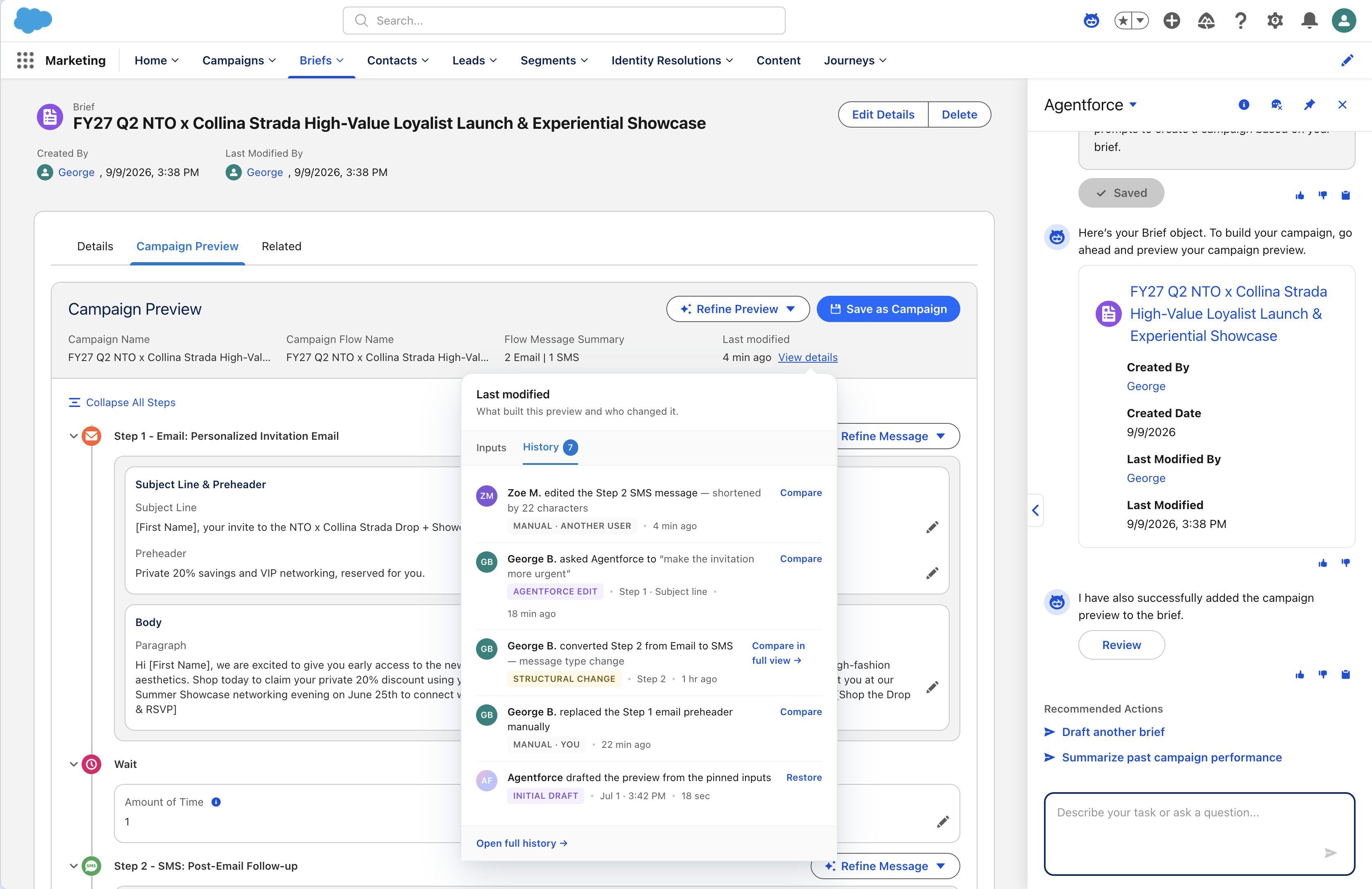
Lack of provenance
A persistent audit log tags every element as AI versus human authored, a transparent system of record for both the marketer and the model.
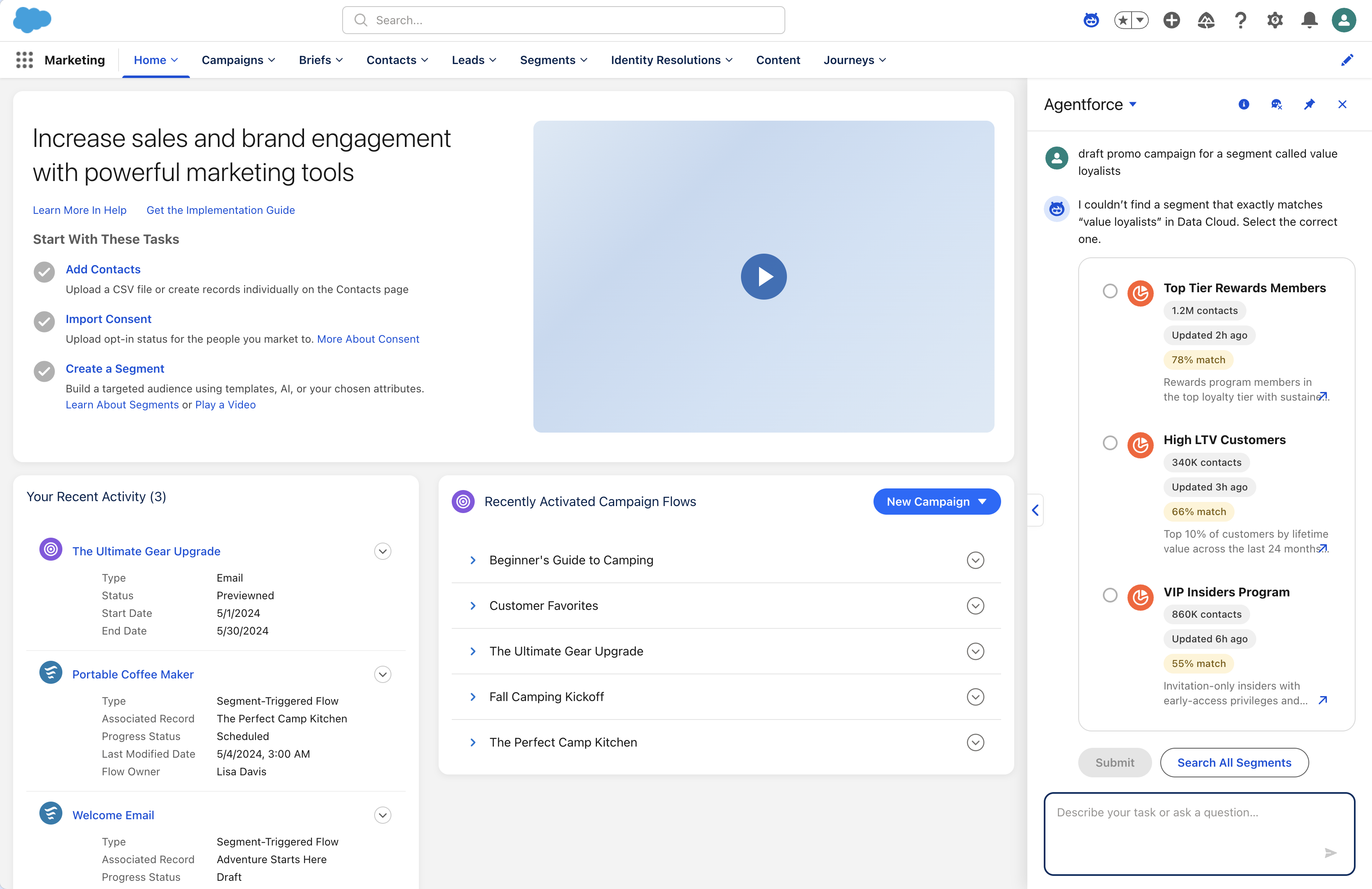
The vague prompt trap
LLMs are non-deterministic, so when a prompt lacked context I couldn’t let the agent guess. Conversational slot-filling and progressive-disclosure fallbacks guide the marketer into supplying the missing parameters, instead of failing silently or hallucinating.
Grounding failures
When the underlying CRM data is missing, the system detects it and surfaces a transparent grounding fallback before generation starts, so it fails gracefully rather than confidently producing something wrong.
The control: the agentic workspace & intent-based orchestration
Steering shouldn’t cost a prompt every time.
The second signal, refinement fatigue, pushed the design past the chatbox. The agent now bridges conversational speed and visual control: drop a prompt, and it drafts the brief and maps a full multi-channel campaign onto the canvas, with the assistant docked for big-picture orchestration.
But to combat refinement fatigue during micro-edits, we moved beyond the chatbox entirely. We embedded quick actions directly onto the generated campaign nodes as intent-based direct-manipulation controls. Instead of typing prompts for minor tweaks, marketers express intent through contextual actions, right where the content lives:
- Nudge the tone.
- Shorten a subject line.
- Regenerate a single step, one click.
We blended the generative speed of AI with the precision of direct-manipulation UI.
05
The Impact.
By targeting marketing’s heaviest lift, the Generate Campaign from brief workflow, we collapsed campaign creation from weeks to minutes. Since the Spring 2026 release, it’s seen rapid, sticky adoption and shifted marketers from manual building to strategic orchestration.
-
Account adoption
~70% adoption.
Adopted by nearly 70% of all organizations that currently have Agentforce activated since the Spring ’26 rollout.
-
Weekly active use
>50% weekly active.
Highly sticky engagement: more than half of adopted accounts have turned this into a core weekly routine post-launch.
-
Executive investment
Funded for what’s next.
Proven commercial traction and visceral user utility directly accelerated executive funding and resourcing for the broader Agentforce Marketing Goals Agent.
Reflections & design takeaways
AI doesn’t replace the craft; it clears the busywork around it. The work was less about the model than the scaffolding: an obvious next step at every stage, and trustworthy ways to review, edit, and approve before anything ships.
The center of gravity is shifting from screens to systems. This year I started building with Claude and Cursor, so I hand engineering a working prototype to align on intent, not the production build. That’s where I see AI-native design heading.
As the tech moves, expectations move with it, so I designed the system, not the UI. The patterns that held up I carried into the goals agent as defaults: a clear next step at every stage, review-edit-approve guardrails before shipping, visible provenance, in-place refinement over re-prompting, and one canvas for agent, brief, and preview.
A moving product makes a fixed baseline impossible. Benchmarks kept going stale, so we made benchmarking faster and more frequent, an ongoing rhythm, not a one-time study.